Getting started
- Install on your PC - download the Windows installer above. Windows may show the two prompts below during installation (both are normal).
- Pick a shared folder - in the PC program's Settings, choose the folder you want on your phone, or drop a folder onto the window. Only the videos, comics and books in it are shown.
- Install the app - get the Android app on Google Play. The iPhone (App Store) app is coming soon.
- Connect - sign in on the phone app with the same account as the PC, then with phone and PC on the same Wi-Fi, open Library in the app and press Allow when the PC asks.
Two Windows prompts you may see while installing
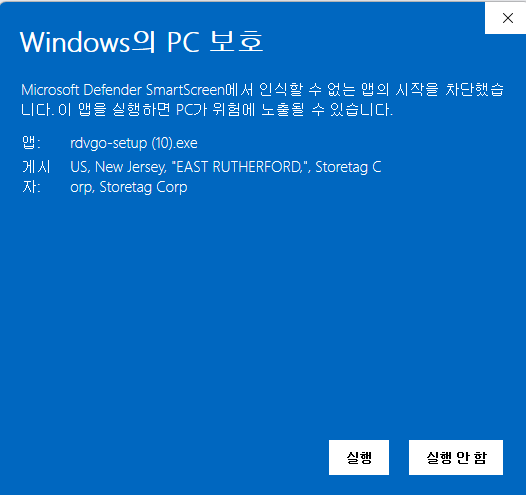
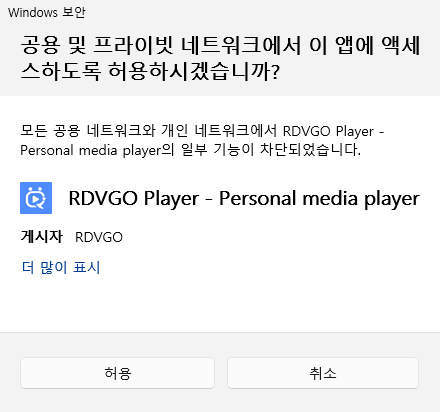
Can't connect? See Connection troubleshooting. The usual cause is the firewall prompt on first launch.
Key features
Original quality
Plays the original file, never re-encoded to a lower quality. Subtitles too (smi, srt, ass, vtt, embedded).
No server in between
Video goes directly (encrypted) between your PC and phone. rdvgo.com only introduces them.
Continue anywhere
Stop on the PC, phone or TV and continue from the same spot elsewhere - or save to the phone and watch offline.
Phone remote
Control a PC connected to your TV from your phone - even its volume with the phone's buttons.
Watch together and sharingPlatinum
Watch with a friend from one link, and share folders with other members.
Why RDVGO
Everything you need to keep watching the videos on one PC on that PC, your phone, your TV and a friend's screen - in one program and one app.
| A typical PC video player | Uploading to a cloud service | RDVGO | |
|---|---|---|---|
| Watch your PC's videos on phone and TV | No | After uploading | Right away, no upload |
| Quality | Original | Usually compressed | Original |
| Your files on someone else's server | - | Yes | No (direct connection) |
| Continue across PC, phone and TV | No | Depends on the service | Automatic |
| Control the PC from your phone | Separate app | - | Built in (free) |
| Watch together with a friend | No | Depends on the service | One link (480p even without an account) |
| Storage fees | - | Monthly, by size | None (your PC is the storage) |
Guides by device
Plans
| Free | Original playback on the same Wi-Fi, 3 completed downloads, phone remote, watching Watch together |
| Premium | Unlimited downloads, Cast to TV, no ads, receive shared folders |
| Platinum | Your PC away from home, send folder shares, host Watch together (up to 1080p) |
A purchase applies right away - no restart needed. Full refund within 14 days; cancel a subscription any time before the next billing date.
System requirements
- Windows 10 / 11 (64-bit)
- Same Wi-Fi as the phone at home; away from home with Platinum
- Android 7.0 or later
- Cast to TV: Chromecast or a DLNA TV (Samsung, LG, ...)
- Watch together also works in a browser
Frequently asked questions
Are my videos uploaded to rdvgo.com?
No. Video goes directly between your PC and your phone (or viewer). The server only handles sign-in and introduces the devices.
My phone can't find the PC.
Check that both are on the same Wi-Fi, that the PC program is running, and that you allowed the firewall prompt on first launch - the "Re-allow firewall" button in the PC settings is the easiest fix. More in Connection troubleshooting.
Windows shows "Windows protected your PC" when installing.
It appears for new programs. Click More info, then Run anyway.
I cast to the TV but there are no subtitles.
Only external subtitle files next to the video (smi, srt, ...) can be sent, and whether the TV shows them depends on the model. If you need subtitles for sure, connect the PC to the TV and use the phone remote.
Can several people watch one Watch together link?
One link is for one viewer. Make a new link for someone else.
How do I update?
The PC program and the app tell you when a new version is out. See what changed in What's new.